02 — Install on Your Laptop (Local k3d)
Time : 15 min walltime (5 min hands-on + 10 min wait) · Persona : engineer / admin · Path : B
This chapter gets a full AKKO platform running on your laptop. You own every layer, no public domain involved.
Pre-requisites
- Docker Desktop ≥ 4.20 or Colima ≥ 0.6 (Apple Silicon supported).
- 16 GB RAM available (12 GB minimum, but expect tight scheduling).
- k3d ≥ 5.6 — install with
brew install k3d(macOS) orwget -q -O - https://raw.githubusercontent.com/k3d-io/k3d/main/install.sh | bash. - helm ≥ 3.13 — install with
brew install helmor your package manager. - kubectl ≥ 1.28 — install with
brew install kubectl. - git any modern version.
Verify everything with
k3d version && helm version && kubectl version --client && docker version.
Step 1 — Clone the repository
Expected result : a directory listing that contains helm/, docker/, docs/, branding/.
Step 2 — Generate per-domain config and dev secrets
AKKO is zero-hardcoded : every URL, role, and credential is generated for your domain. Pick any name (we use akko.local).
Expected result : the script prints generated helm/examples/values-domain.yaml and generated helm/examples/values-dev-secrets.yaml. Both files are gitignored.
What just happened? The first script materialised every service URL (
https://demo.akko.local,https://identity.akko.local, etc.) and a fresh realm export. The second generated random passwords for every internal service account.
Step 3 — Deploy
This single command :
- Creates a k3d cluster called
akko(or reuses an existing one). - Builds the 21 custom container images locally.
- Installs the umbrella Helm chart (44 sub-charts).
- Seeds the identity realm with 5 persona accounts.
- Seeds the demo banking catalog.
Expected result : the script ends with Deploy complete. Open https://demo.akko.local after roughly 5 minutes (the image build is the long part on first run).
If
deploy.shexits withimage build failed, rundocker system df— you may be out of build cache. Free space withdocker system prune -f(safe : only removes dangling layers).
Step 4 — Wait for green
Watch the platform converge to Ready :
Wait until every pod is Running or Completed. Cold start typically takes 3 to 5 minutes after the deploy command finishes.
Expected result : kubectl get pods -n akko shows 30+ pods, all Running or Completed. Press Ctrl-C to stop watching.
A few pods (init jobs, secret rotation) end in
Completed— that is success, not failure.
Step 5 — Add /etc/hosts entries
Local domains need DNS resolution. Append this block to /etc/hosts (requires sudo) :
127.0.0.1 demo.akko.local identity.akko.local catalog.akko.local
127.0.0.1 federation.akko.local compute.akko.local orchestrator.akko.local
127.0.0.1 lab.akko.local bi.akko.local experiments.akko.local
127.0.0.1 llm.akko.local metrics.akko.local logs.akko.local
127.0.0.1 alerts.akko.local docs.akko.local mcp.akko.local
Expected result : ping demo.akko.local returns 127.0.0.1 immediately.
Why a script doesn't do this for you. Editing
/etc/hostsrequires root, and we never ship a script that asks forsudosilently. Copy-paste is the trust-by-default choice.
Step 6 — Open the cockpit
Open https://demo.akko.local in your browser.
The first visit triggers a TLS warning because the dev certificate is self-signed. Accept it (Chrome : "Advanced" → "Proceed").
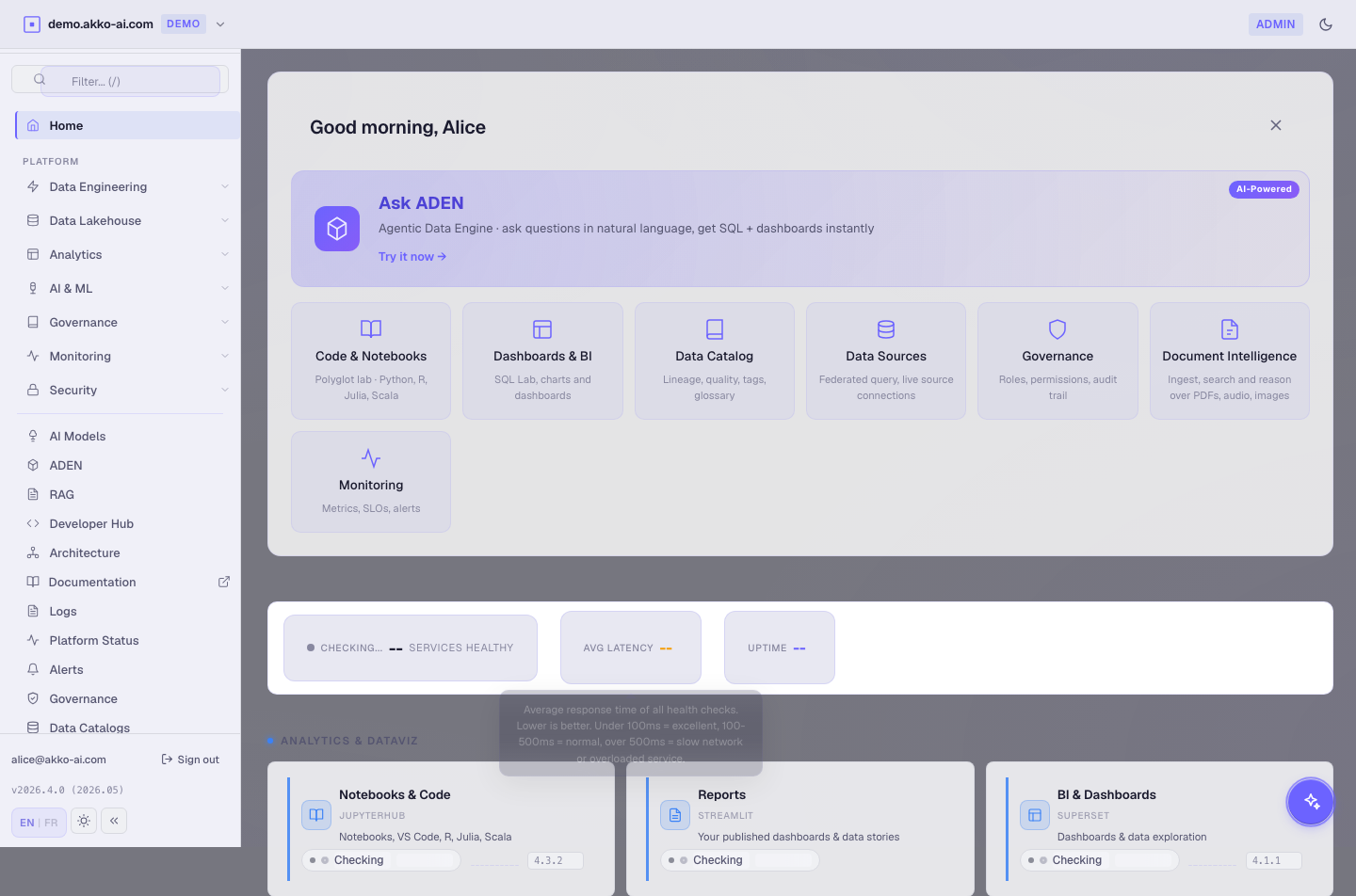
Expected result : the identity provider sign-in page loads. Log in with alice / alice123. You land on the cockpit Home with a purple akko-admin badge.
Step 7 — Verify the 10 layers are live
In the cockpit Home, scroll to the Layer health grid. Each tile should be green.
# CLI alternative — every layer health endpoint:
curl -sk https://demo.akko.local/api/health/all | jq
Expected result : every layer returns { "status": "ok" }. If any layer is degraded, wait 30 seconds and retry — some sub-charts take an extra cycle to mark themselves ready.
Troubleshooting
| Symptom | Likely cause | Fix |
|---|---|---|
deploy.sh : Cannot connect to Docker daemon |
Docker Desktop / Colima not running | Start Docker Desktop, retry. |
deploy.sh : image build failed: insufficient space |
Build cache full | docker system prune -f then retry. |
Browser : ERR_NAME_NOT_RESOLVED |
Hosts file not edited (Step 5) | Append the block, save, retry. |
kubectl get pods -n akko shows ImagePullBackOff |
k3d registry mirror not configured | bash helm/scripts/deploy.sh re-runs the registry-mirror setup. |
helm install : release already exists |
Previous install half-finished | helm uninstall akko -n akko then re-run deploy.sh. |
| Identity provider 504 on first login | Cold start, JVM warming | Wait 30 sec then refresh login page. |
Full reference : Troubleshooting and the Installation runbook.
What you just learned
- AKKO deploys with three commands on any laptop with Docker.
- Every URL and credential is generated from your chosen domain.
- The 10 layers come online together, observable from one dashboard.